Kids Learning Apps Study 2026: What 179 Top Google Play Apps Really Cost
“Free” is the word parents see most on kids apps. We wanted to know what free really means. So on 25 September 2026 we typed 10 searches parents use into Google Play and checked every app it showed — 179 apps in all.
Numbers: see kids screen time statistics 2026 — 20 facts with sources.
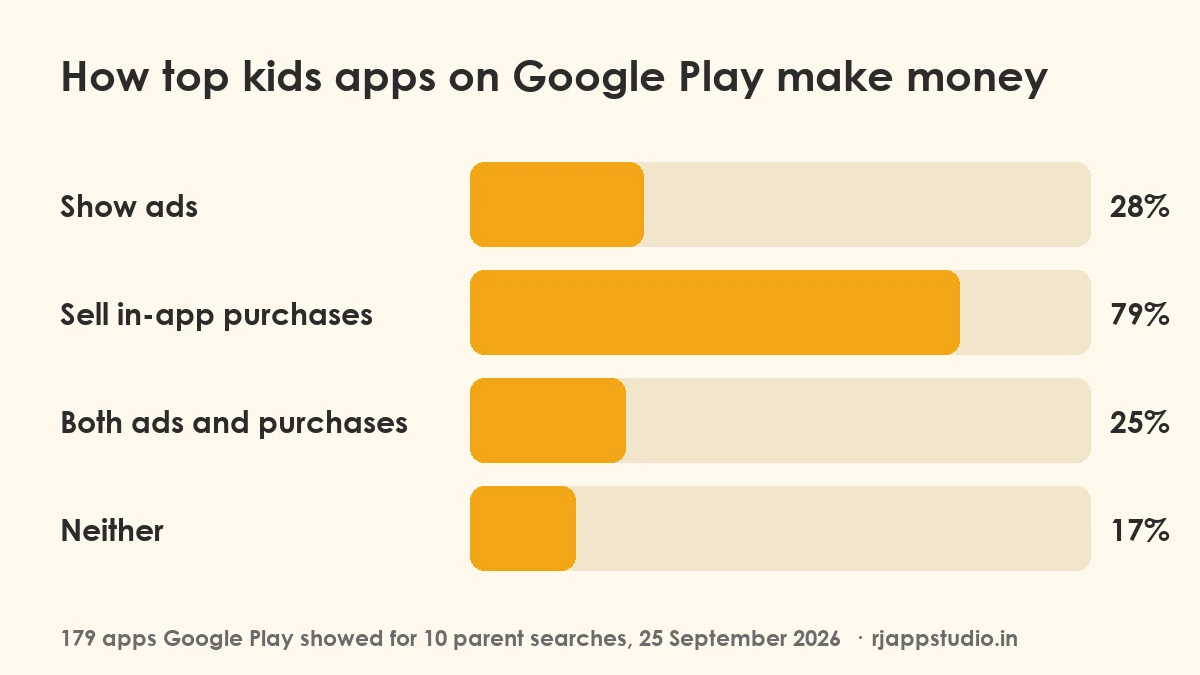
The short answer: most top kids learning apps are free to download but not free to use. Four in five sell in-app purchases. Only one in six has no ads and no purchases at all.
Key Findings
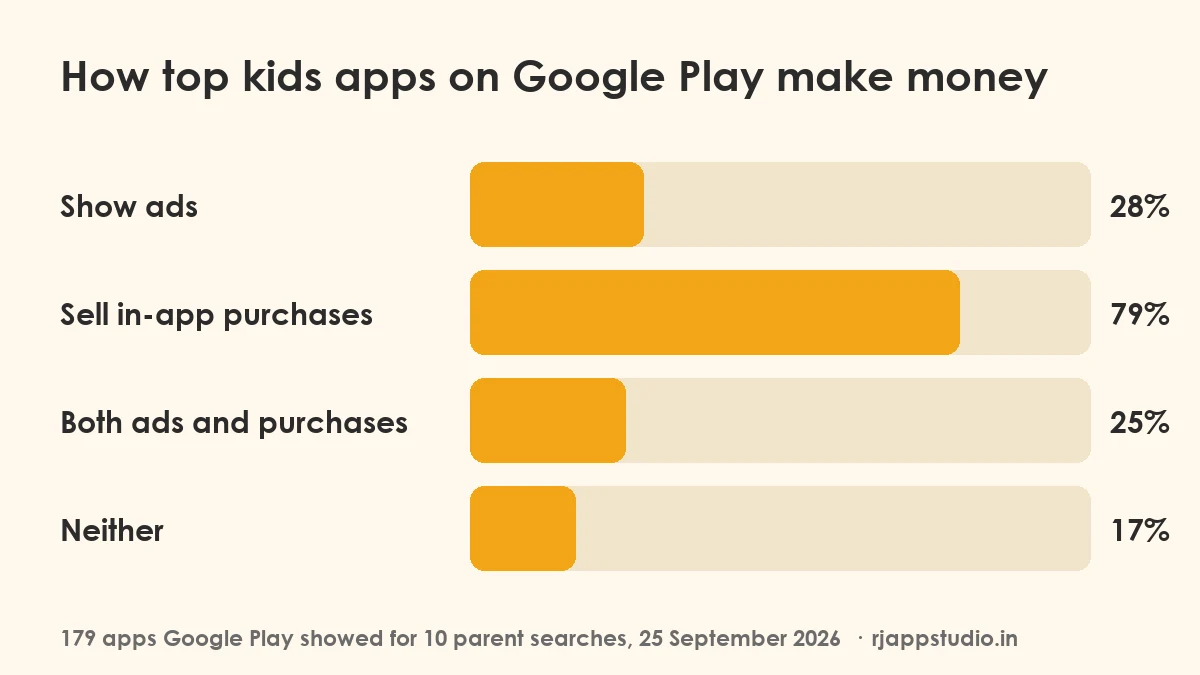
- 79% of the apps sell in-app purchases (most are subscriptions or unlocks).
- 28% show ads. 25% do both: ads and purchases.
- Only 17% have neither ads nor in-app purchases.
- In the top 5 results of each search, 61% sell purchases and 26% show ads.
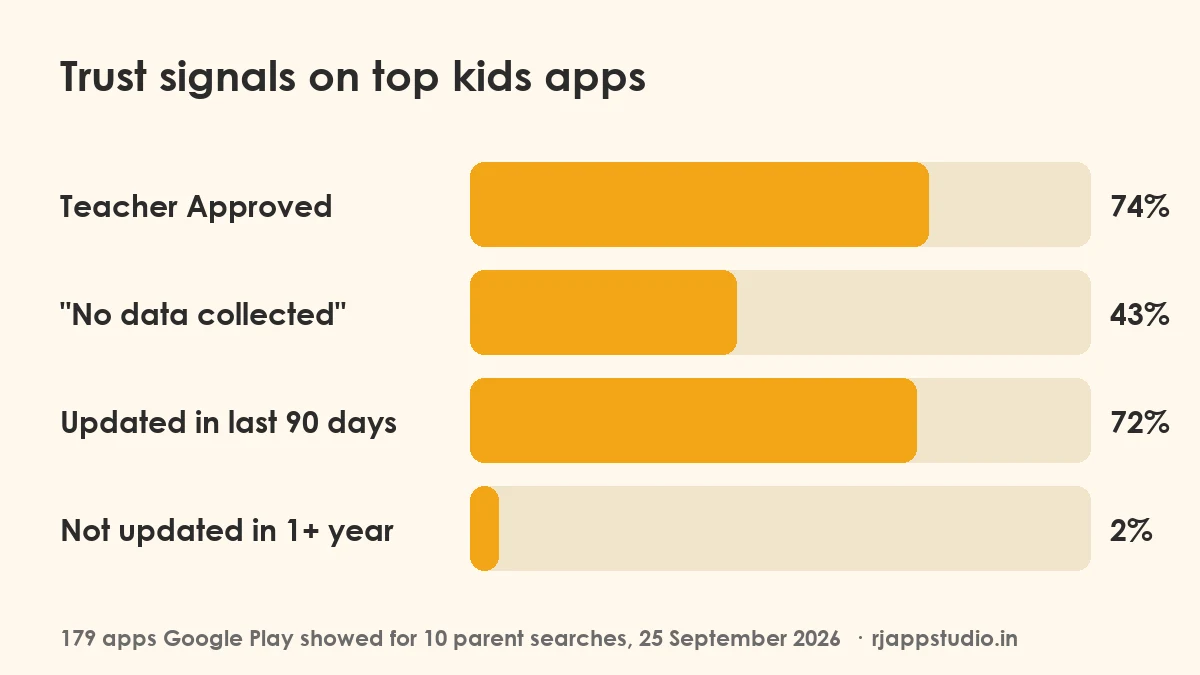
- 74% carry Google’s “Teacher Approved” badge. Of those, 23% still show ads.
- 43% say “No data collected” on their data safety label. 62% say they share no data with third parties.
- 72% were updated in the last 90 days. Only 2% had gone a year without an update.
- The median rating is 4.3 stars. 31% are rated 4.5 or higher.
- One in four apps (25%) has 10 million or more downloads.
- RV AppStudios had the most apps in the results (15 of 179), then Bebi Family and Bimi Boo (8 each).
How We Did It
We searched Google Play (US store, English) for these 10 phrases and took every app on the first page of results:
kids learning games · toddler games · abc kids · 123 numbers for kids · phonics for kids · kids math games · preschool learning games · tracing letters for kids · baby games · kids coloring games
That gave 179 different apps. For each one we read its public store page: downloads, rating, last update, the “Contains ads” and “In-app purchases” labels, the “Teacher Approved” badge, and the data safety summary.
What this study cannot tell you: how much money an app makes, how many ads a child actually sees, or what an app does after you install it. It reports what each store page says, on the day we checked. Store results also change with country and over time.
You can download the full data (CSV, 179 apps) and check any number yourself.
Finding 1: Purchases, Not Ads, Are How Most Kids Apps Earn
Many parents worry most about ads. But in this study, in-app purchases are far more common: 79% of apps sell them, against 28% that show ads.
In kids apps, an in-app purchase is usually a subscription that unlocks most of the games. The first few levels are free; the rest need a monthly or yearly plan. That is not bad in itself — it pays for the app — but it means “free” often means “free trial”.
Only 31 of 179 apps (17%) had no ads and no purchases. Those are the truly free ones.
Finding 2: The Top Results Look the Same
Parents rarely scroll far. In the top 5 results of each search (38 different apps), 61% sold purchases and 26% showed ads — close to the full list. Being near the top does not mean an app is free.
Finding 3: Teacher Approved Is Common, and It Is Not “Ad-Free”
Google gives the “Teacher Approved” badge to apps that teachers and experts review for quality and age fit. 74% of the apps we checked had it, so it is a good sign but not a rare one.
The badge does not mean an app has no ads. Of the Teacher Approved apps, 23% still showed ads. Always check the “Contains ads” and “In-app purchases” labels under the app name too.
Finding 4: Fewer Than Half Say “No Data Collected”
Every Play Store page has a data safety section written by the developer. 43% of these apps say they collect no data at all, and 62% say they share no data with third parties. The rest collect or share some data, often for ads, analytics or accounts. Tap “Data safety” on the store page to see what and why.
Finding 5: Kids Apps Are Well Looked After
72% of the apps were updated in the last 90 days, and only 2% had gone more than a year without an update. The median rating was 4.3 stars.
What This Means for Parents
1. Read the two labels under the app name. “Contains ads” and “In-app purchases” are shown on every store page, right under the title. 2. Turn on purchase approval. In the Play Store app, open your profile → Settings → Authentication → “Require authentication for purchases”. If your child has their own account, Google Family Link lets you approve each purchase. 3. Check “Data safety” before you install, especially for apps that ask for an account. 4. Treat Teacher Approved as a quality sign, not a price sign. It tells you about the learning, not about ads or purchases. 5. Try before you commit. If an app’s free part is only a few levels, you will find out in five minutes.
Use These Charts and Data
Journalists, teachers and bloggers are welcome to use these charts and numbers. Please credit RJ App Studio with a link to this page. To embed a chart, copy this code:
Who We Are
We are RJ App Studio, a small team that makes kids learning apps. So you know where we stand: our kids apps are free, most of them show ads, and none sell in-app purchases. Only one of our apps appeared in these results (ABC Phonics: Learn to Read, #28 for “phonics for kids”). We did this study to understand the market we work in, and we publish every number so you can check it.
For more help choosing, read our guide to learning apps for toddlers and our screen time guide.
Frequently Asked Questions
What percentage of kids apps have in-app purchases?
In our study of 179 top kids learning apps on Google Play (September 2026), 79% sold in-app purchases. In the top 5 search results, it was 61%.
Do Teacher Approved apps have ads?
Some do. 23% of the Teacher Approved apps in our study showed ads. The badge is about learning quality and age fit, not about ads or price.
How many kids learning apps are completely free?
Only 17% of the 179 apps had neither ads nor in-app purchases.
How do I stop my child buying things in an app?
In the Play Store app, go to your profile → Settings → Authentication and turn on “Require authentication for purchases”. For a child’s own account, use Google Family Link to approve purchases.
Can I use this data in my article?
Yes. Please credit RJ App Studio and link to this page. The full data is free to download as a CSV file.